


Houdini DHA basic_The Chain Tool
- ychen3129

- Aug 18, 2021
- 1 min read
I haven't been create digital asset for a while.
Going through some tutorials to refresh my mind
the chain tool
Drop down a torus to begin

press 2 to enter point selection mode

Go to top view, select the point on the right side
press M to change to pivot

create a chain like shape, it automatically create the edit node for you
to center the Geometry, add a match size node

create a draw a curve node, allow you to draw the curve on the plane

select the handle too
draw the curve

Next, we want to populate chain on the curve use copy to curve node

Go to scales and shears to scale down the geo

Because the point is not evenly space out
That's create a resample node
adjust the length to make it less density

Go back to copy to curve node
under additional rotation
adjust the yaw to 90 degree

check apply roll or twist
set full twist to 7
now we have chain
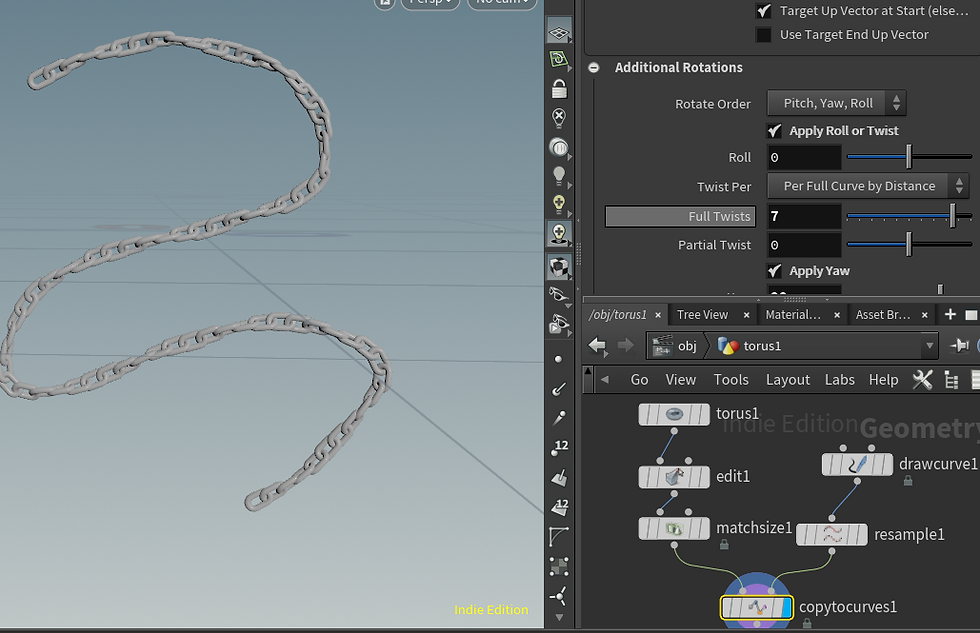
Now its time to pack/convert it into a HDA
first select everything in the tool but exclude the drawcurve node since it is our main user input.

Give it a name and hit accept
the edit operator type properties window will appear

This is where you can add your parameter for your tool here
if you close the window, just select your chain tool, go to assets tab> edit asset property> select the tool name

the easiest way to add parameters is just to drop the parameter in
Here, we take the scale of the copy to curve node, length of the resample node
when done just press apply

All set


Comments