


UE tips: How to change your UE vault cache and app data default path
- ychen3129

- Mar 28, 2023
- 1 min read
Got a new computer only half year and take a look at my 1TB C-drive.

I am like??????????????

Then I dug around and here is why
#1 C:\ProgramData\Epic\EpicGamesLauncher\VaultCache
#2C:\Users\ychen\AppData\Local\UnrealEngine\common
#3 Bridge library path

To change the vaultCache location:(That should be the first thing you need to do after you install your Engine)
Open the launcher, go to setting

Choose Edit Vault cache location

Change it to your bigger drive

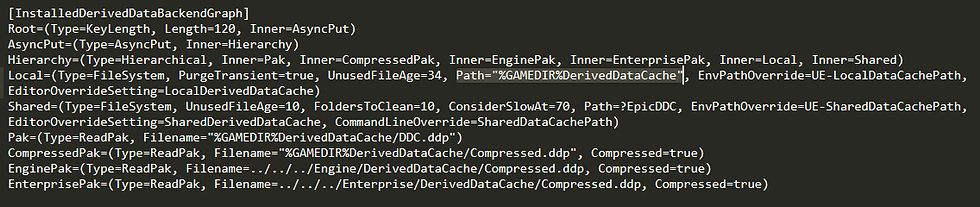
#2 change the common folder path
this path needs to be changed for each UE version installed on your computer
For example, on my ue5,go to C:\Program Files\Epic Games\UE_5.0\Engine\Config, open the baseEngine config file

look for: %ENGINEVERSIONAGNOSTICUSERDIR%DerivedDataCache

replace it with %GAMEDIR%DerivedDataCache
For stand-alone bridge app
go to edit>setting change the library path there


For the Bridge plugin (UE5), go to the preferences


Comments