


UE Tips: Import to Level
- ychen3129

- Mar 11, 2024
- 2 min read
When we set up an UE scene. There are two methods.
Artists created all the modular pieces and props in DDC, then exported them as FBX files then imported them into Unreal Engine (UE) for scene assembly.
Another method involves directly constructing the scene within DDC. This approach is more common in virtual production because many of the collaborating teams come from offline rendering backgrounds and are not accustomed to working with engines.
In such cases, if we just simply importing the FBX into the content browser that can lead to several issues:
The origin is not located at the mesh itself.
Instances in the scene cannot be imported or import repeatedly
The scene hierarchy is missing.
Two solutions:
one is the USD workflow, which I will discuss in a later post.
The other method is importing to the level, which can maintain instance and hierarchy.
Let's do an example
Here is my simple scene in maya. I have 4 spheres in the scene, three of them are instance of the original sphere. (Make sure on export setting. Enable preserve instances)

If I just do the simple fbx import into UE.
This is the result, sphere instances are imported as individual meshes, the origin of the mesh is forced to be (0,0,0), and there is no hierarchy on the outliner

If we do import into level instead:
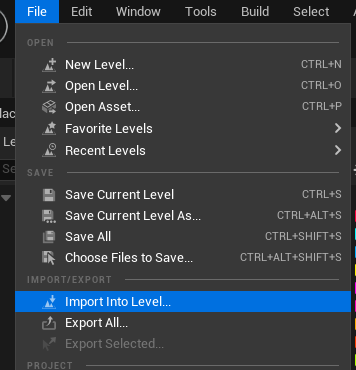
Select the file tab, then choose import to level
It would give us this pop up window, FBX import scene option

I would select the Create Content Folder hiearchy
and for the Hierarchy type, there are 3 options, level actor/actor component/ blueprint (it is up to different use-case to choose which type)
I would do use create level actor for this one.

As we can see here, the hierarchy has been maintained in both the content browser and the level. Sphere is only been imported once and instance in the scene.
Hope you find this helpful. Happy sharing.


Comments